Boba Cafe Simulator Best Cafe Layout Guide
Arrange cups, cookers, and sealers so every drink moves forward — never backward — during rush hour.
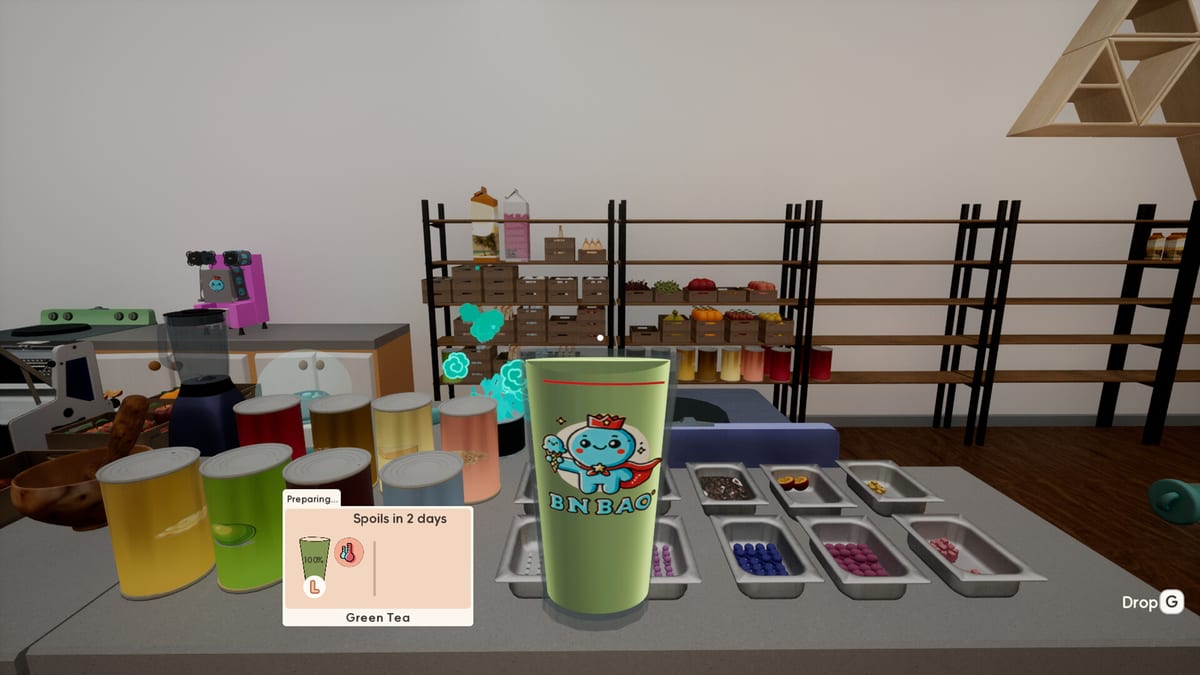
The best cafe layout in Boba Cafe Simulator is the one that lets you finish drinks without crossing your own path twice. Speed comes from station order, not from sprinting. When lemonade, coffee, and boba orders arrive together, a good floor plan keeps labels, bases, customizations, and finishing supplies within one continuous loop. A bad plan sends you from sealer to back storage to register to cooker while cups cool and happiness drops.
This guide translates general simulation wisdom into concrete placement rules for Sugarville’s starter space, expanded floors, and co-op cafes.
The one-direction drink line
Imagine drinks flowing left to right (or clockwise around a island):
- Register and payment — accept orders deliberately; do not overfill the queue.
- Cup organizer and label printer — attach labels before any liquid touches the cup.
- Base prep — dispensers, milk, juicers, coffee machine outputs.
- Customization — sugar, ice, steam heat.
- Finishing — sealer or hot lid, straw attachment.
- Service — E at counter for dine-in; bagging zone for delivery.
Never place the sealer behind the register if customers block your return path. Never store empty delivery boxes on the customization counter — they steal space where labels should spread left-to-right in order.
Boba station loop
Boba is the layout stress test because it chains the most stations:
- Induction cooker and pot for pearls
- Topping bowl fed from the pot
- Tea dispenser filled from a second pot brew
- Milk crate within arm’s reach of the cup
- Sugar and ice after liquid ratios
- Sealer and wide-straw organizer at the loop exit
Cluster these within three meters. If pearls finish cooking at the back wall while cups wait at the front sealer, you lose batching advantage from pre-opening prep.
Hot boba adds paper cups and lids near the steam point without merging into the cold sealing line. Mixed hot/cold finishing on one cramped tile causes habitual wrong lids — the game punishes that with failed Perfect checks.
Coffee and fruit adjacency
Coffee wants beans, grinder, machine, paper cups, sugar, and lids in a tight arc. Fruit drinks want produce crates adjacent to the cutting board and juicer, then a short walk to ice.
If both categories are listed on your menu, place shared ice and sugar between the two loops rather than at the far end of the room. Lemonade shares sugar and ice too — three loops meeting at one hub is normal for mid-game menus.
Label discipline and physical queue
Layout supports behavior: cups sit oldest order closest to prep, newest behind. Three lemonades with different ice levels look identical without labels — spatial order is your backup memory.
Leave counter space for at least four labeled cups without stacking. Stacking hides labels and causes customization errors. If space is tight, reduce accepted orders instead of reducing label visibility.
Move mode and starter-room optimization
Press Q for move mode. Furniture snaps to walls; mouse wheel rotates pieces. The tutorial crate layout is functional but not optimal — reorganize on day one during closed hours.
Priority moves before first expansion:
- Cup boxes into the organizer, not the floor
- Label printer at the start of prep, not beside the door
- Recycling and empty cartons to a back corner — sell to the town recycler when quiet
- Lights and machines off until needed — power shows on the Bills app
Delivery corner separation
After takeout unlocks, carve a delivery zone with its own label printer, bag pile, and staging shelf. Finished delivery drinks should not pass through the dine-in pickup window.
Route the delivery corner along the path to the exit map marker. Couriers and personal runs both benefit when bags are pre-staged near the door. Full steps in How to Deliver; contract timing in Platform Contracts.
Mixing printers is the layout error that creates the most costly remakes — wrong address on a sealed boba cup wastes pearls and milk.
Dining tables versus production priority
Dining furniture adds ambience and future dine-in pacing as systems mature. During early profit grinding, production equipment outranks decorative tables. Place tables without blocking the prep highway — customers wandering through your boba loop is worse than no seating.
Popularity bonuses from decor are real; see Decor and Popularity. Invest in atmosphere after loops work, not before.
Co-op zoning
With multiple players, assign zones not individual orders:
- Player A: boba loop end-to-end
- Player B: coffee and lemonade
- Player C: fruit and ice restock
- Player D: delivery bagging and phone contracts
Zones need parallel loops that do not share a single-tile chokepoint. Duplicate critical supplies (straws, cups) at two hubs if traffic jams persist.
When to expand the floor
Expand when loops are optimized but physically cannot fit the next required appliance — second cooker, delivery printer, steam machine — not when skill issues masquerade as space issues.
Measure expansion cost against rent from the Bills app. One extra tile width sometimes beats an entire new room you cannot afford to light.
Layout checklist before opening
- Cups, lids, straws stocked in organizer
- Label printer at prep start
- Each active recipe loop walkable without backtracking
- Delivery corner isolated if takeout is live
- Floor clear of empty boxes
- Machines off until first order needs them
Pair this checklist with menu review in Menu and Pricing and equipment audit in Equipment from Mr Wong.
Related guides
Hub: Build. Gear purchases: Equipment. Popularity and sign choice: Decor and Popularity. Menu size limits: Recipes hub.
Item Alignment QoL
Patch 1.029 added Item Alignment so furniture and equipment snap into neater rows. Use it when redesigning after unlocks — tidy aisles help both NPC Staff pathing and eight-player co-op traffic. Alignment will not fix a bad triangle (cups → prep → sealer), but it stops micro-gaps that trap avatars mid-rush.
Frequently Asked Questions
Quick answers for new and returning cafe managers.
What is the most important layout rule?
Arrange stations in the order you use them: cup and label, base liquid, sugar and ice, seal or lid, straw, then serve or bag.
Can I rotate furniture while the shop is open?
Move mode works anytime, but reorganizing during service blocks customers and slows orders. Rearrange while closed.
Why keep delivery separate from the counter?
Separate label printers and bag zones prevent attaching dine-in labels to delivery cups, which causes remakes and lost ingredients.
How much counter space do I need per drink type?
Plan enough flat space for at least four labeled cups in queue per active loop. If you cannot fit that, reduce menu size or expand.